



I promised you guys an update on my meal-planning post from a few weeks ago. Here it is! I hope you aren’t disappointed that I don’t have this new grand plan with printables and tools and websites and “seven weekly staples” and all that jazz. After trying a few different methods, I realized that S I M P L I C I T Y was what I needed most. Surprise, surprise.
The one major tool I did try out was the Plan To Eat meal planner. I liked it. It’s a great tool for those of you who are hardcore recipe savers and planners. (Although it does cost a monthly fee and I just did the trial.) My favorite feature was how it formatted the recipes for easy kitchen use. But it ended up being one more site to click into to check on dinner, and I found myself flip flopping back and forth between my meal-planning calendar and my Google calendar way too much. I need flexibility and simplicity most of all.
I thought doing a theme day might be my best solution, but even that wasn’t flexible enough. We are always planning around events, dates, leftovers, parties.
I thought creating elaborate pinterest boards of “recipes to try” and “favorite recipes” would be a good solution, but as it turns out, keeping it simple ended up being the direction I went. Pinterest overwhelms me, and like Plan To Eat, it would have added another step.
So as it turns out, just a few tiny tweaks to my current work flow system was all I needed.
1 // The Meal Plan Is Done By Friday
My biggest hangup was trying to do the meal plan on the same day as we went to the grocery store (usually Sunday morning.) So my new rule is the meal plan and grocery list must be done by Friday the week before. This is perhaps the biggest game changer. And it was such a simple change. I just have to stay on top of it!
2 // Making My Meal Plan In TeuxDeux
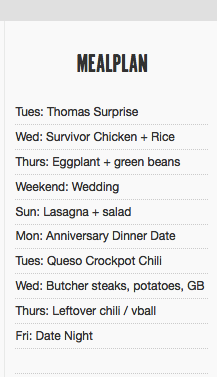
I LOVE TeuxDeux and use it for my weekly task scheduling. At the bottom of your weekly calendar, you can make “anytime” lists, so I now have a “Meal Plan” list. By putting the meal plan into something I check 10x a day and keep open in my computer browser, I see it often and am reminded of what’s coming next. The reason Plan To Eat, Google Calendar, etc. hadn’t worked for me in the past was that I didn’t check them enough. I didn’t want to have to go to a new website each time I wanted to be reminded of what’s for dinner. So if you need simplicity like me, whatever you use for your daily task list is probably the best list for meal planning too. (There is one big drawback to this and that is that Thomas can’t see our meal plan, but for now this problem is minor.)
What I also found to be a challenge using a meal planning software is that a lot of times I just needed to write in something rather than actually plan a recipe. For example: date night or leftovers. When I did use Plan To Eat for a bit, I was only planning a few recipes but using a lot of words. I like doing it right in TeuxDeux because I can plan a week really, really fast. Because I also have my Google Calendar open at all times, I can very quickly cross check with our schedule while doing my plan to see what evening events we have going on. (I can also quickly see Matt’s calendar and know which nights Mazen has dinner with him, which affects our plan.)
3 // Create A Shared, Digital, Check-off-able Grocery List
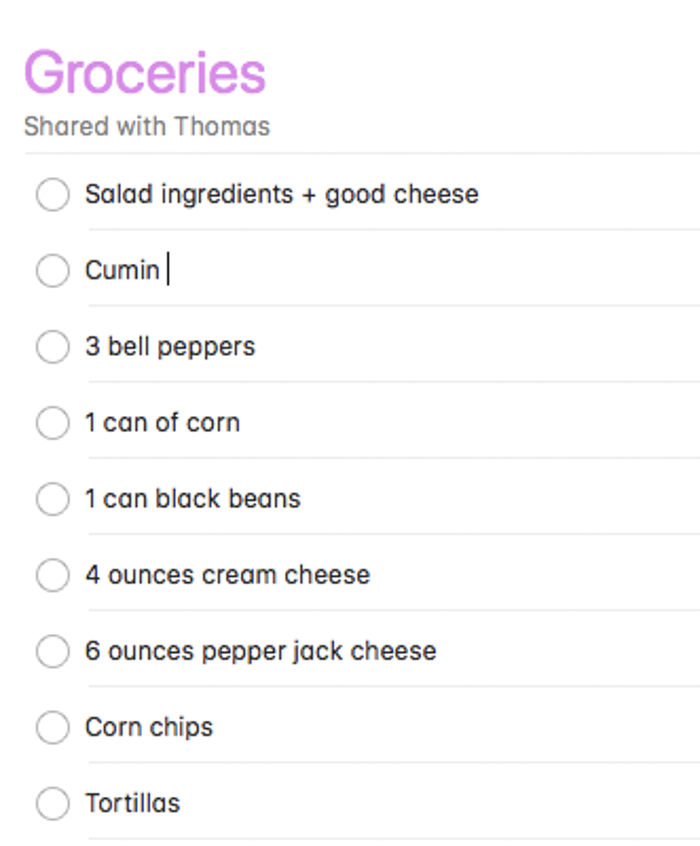
Thomas and I use the iPhone Reminders app to manage our shared grocery list. I add to it throughout the week, and it’s easy to check things off in the store without pen and paper. So when I make the meal plan, I add to this list. I think apps that automatically create a shopping list are great if you have a totally empty fridge and pantry, but so often we are using up staples like rice or spices that we already have, and you have to remember to cross those off. So a simple “add it myself” list is what works best for me. I can also group things together such as “salad ingredients,” which allows me to shop what’s on sale in the moment verses having a list that says “1 zucchini, 2 peppers, 1 broccoli” and not remember which is for a recipe and which is for salad staples.
4 // Set Reminders
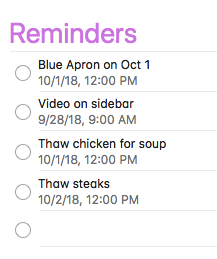
During the 20 minutes or so I am making the meal plan and grocery list, I also set up any reminders I will need throughout the week. These are mostly “thaw something” or “put XX in crockpot” for the mornings the task is due. This way I can forget about the meal plan until a reminder pops up.
5 // Bookmark Recipes
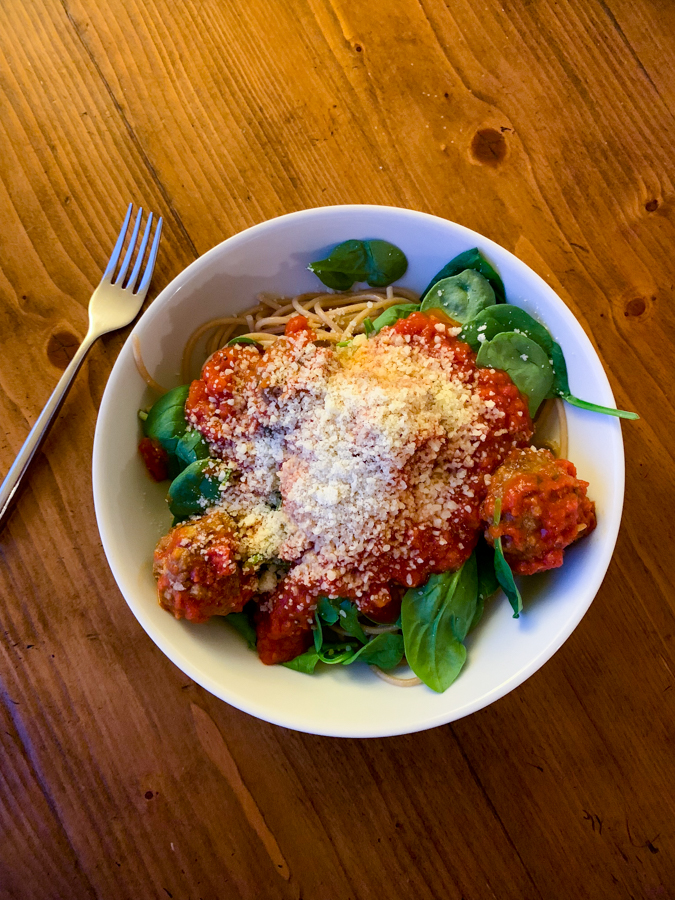
I’d say only about 25% of our meal plan is made up of brand new recipes to try. We are kind of boring and also like to create our own a lot of the time or fall back on favorite staples (like spaghetti and meatballs, which doesn’t require a recipe). But I do look to new recipes for inspiration, and as I navigate the web and blogs see ones that I want to try. So instead of a fancy system, I’m just bookmarking them! It’s really the simplest solution because even if I do end up formatting them in some fancy way, I often do reference the actual blog post for more photos or descriptions. I find Pinterest kind of a pain to click through, and I like that bookmarks are just one big written list (with some favicons for visual!), so that’s what I’m doing for now. When I’m meal planning, I just reference this list and choose a new recipe to try. If we LOVE the recipe it will stay on. If we tried it, liked it, but probably won’t make it again anytime soon, it gets deleted.

So there you have it. My meal plan success that is really just a few very simple tweaks!
Charmaine Ng | Architecture & Lifestyle Blog says
These are great tips! I typically don’t use any apps, but I always make sure to have a meal prep day on Sunday! 🙂
Charmaine Ng | Architecture & Lifestyle Blog
http://charmainenyw.com
Shana says
Simple is really the best! I think we often try to solve problems with complex solutions when really going back to simple is the best strategy. Hopefully it will make life a million times easier once baby arrives!
Tess says
I do the same thing- I already use Google Keep for all my lists throughout the week so my grocery list and meal plan just goes there and I check it regularly anyhow. I need to move planning too fridays tho. Thx. I always do it quickly on Monday morning after I drop kiddo off st school while I sip my coffee, before going grocery shopping. Weekends end up being a bit of a free for all. This is going to help I think!
Judy McSorley says
Everyone has to make a plan that works for them and it sounds like you have done that. I think the hardest thing is to just do it, instead of waiting until the day you need to cook and wonder what’s for dinner. I have used Plan to Eat for 2 or 3 years. You can link your plan to eat meal plan with your Google calendar (I think, or maybe just iCal) so you see your meal plan on the calendar you use all the time. Before switching to Plan to Eat, I used the grocery list app, Grocery IQ. This is a shareable list that organizes groceries according to categories and everyone who shares it can add items and see the list no matter who goes to the grocery store. I’ll check out TeaxDeax. I love new apps.
Tracy says
I love Grocery IQ! Great app. I use it all. the. time.
Liz says
I’m such a pen/paper/old-fashioned type person when it comes to meal planning. I just use a dry erase board on the fridge to plan the whole week (meals, events, dates, kid stuff, etc). Everyone can see it and know what’s going on and when. It has a section for :next week too so we can write upcoming things to remember. I use a paper list for groceries and my husband adds to it as needed. I do use Pinterest and websites for recipes, though. I’ve tried list apps, etc but just can’t get into using them consistently.
ashley says
Are you planning on using this system once the baby arrives? We’re expecting twins in March and my goal is to take myself out of the meal equation as much as I possibly can.
KathEats says
I think some friends are setting up a meal train, so at least in the beginning we might be doing less cooking, but yes, once the newborn phase is over I do intend to keep this system going.
Andrea says
I follow a very similar system! No apps or meal planning websites. I use my apple notes app for my weekly meal plan list, and bookmarks for new recipes I want to try. I’ll also write up the meals we’re having for the week on our family chalkboard in our kitchen. I’d say 90% of my meals are tried and true favourites, and once in awhile I’ll be adventurous and throw in a new recipe to try. I also have a well stocked pantry so I generate my own grocery list.
Ellen says
Those meatballs look delicious!
I’m curious, why do you grocery shop on Sunday morning? I used to work from home and never, EVER went near the grocery store on the weekend. Being able to grocery shop on a lunch break or random Wednesday late afternoon was probably the best thing about not working in an office, ha ha!
KathEats says
Mostly because Thomas LOVES grocery shopping so I have let him take over the task most weeks. Otherwise I might go on a weekdays, maybe Fridays. I would want to be consistent with the day regardless though.
Tracy says
Thomas loves grocery shopping? omg you are so lucky!!! Wish it was that way in my house!
KathEats says
Haha I know! I enjoy it too but I was happy to pass the torch 🙂
Liz says
My husband loves it also. All I have to do is make the list and he happily goes to the store. The only downside is the extras he puts in. Our monthly grocery budget had to increase a bit when he took over. I hate shopping, so I’m good with it.
KathEats says
Same!!! Haha.
Tonya says
“the meal plan and grocery list must be done by Friday the week before” is the most helpful hint for me! Makes so much sense. You’re all set and not thinking your way through your Sat or Sun grocery trip.
Sally says
Agree! I’m always frantically trying to meal plan AND make a list AND shop AND meal prep on a Sunday. Even just doing the meal plan and list earlier in the week would make it so much less stressful.
Carrie says
LOVE THIS. I am forever over-complicating things, which never helps.
The Many Thoughts of a Reader says
What’s currently working for us is that I meal plan on Friday for the next week. We share a google calendar so I also double check that to decide what we will do. And I check our freezer because we buy stuff when it is on sale and stock up so I usually have enough meat and need to use it! During dinner on Thursday night I ask my family what they want the next week and I usually get no answer from the husband and the 7 year old says mac and cheese and spaghetti. I try to accommodate her input. Usually we will have mac and cheese as a side dish or I will let her know she can eat it on the weekend. Spaghetti or a pasta with red sauce dish usually appears at least once a week or every other week as well. We share a google doc shopping list that is broken up into specific stores where we may buy stuff or if one of us sees it on sale we will make note of that. I do use pinterest to save my recipes and if we don’t like them I delete them and if they are immediately a love I print a recipe and put it into our binder above the stove but if we haven’t organized that in awhile I tend to end up printing it a few times ha!
Amy says
Numbers 1 and 4 are totally going to be implemented! I always make my list on Thursday or Friday morning before going grocery shopping on Friday. Setting reminders to thaw this or that is going to be life changing!
I use Google Keep for my meal plan and Grocery IQ for my shopping list. My one hurdle with meal planning is that it seems like plans change after I go grocery shopping. Trying not to waste food or constantly be going to the grocery store is a balancing act!
KathEats says
Totally agree with you about plans changing!! Our meal plan this week has seriously changed 5 times. I think it’s good to plan a few from-the-freezer things for this reason alone. For example, one night I had steaks from the freezer planned and we ended up postponing that back a week so those are still in the freezer. If they’d been fresh we would have had to use them up!
Amy says
Great point! I do tend to freeze the meat I get from the butcher because it goes bad quickly otherwise. Maybe that’s working in my favor after all. 🙂
Stacey says
FYI-It should be TeuxDeux.
KathEats says
Fail! Thanks.
lisa says
I love your tip for setting reminders to thaw something. This is my BIGGEST problem in meal planning that I always forget to take out the protein from the freezer then the whole plan goes out the window.
Liz says
Have you ever checked out https://www.farmhouseonboone.com/. She has a really simple plan for meals.
KathEats says
No but I will!
Ttrockwood says
I have a few bookmark folders with these names-
– new recipes to try
– repeat these
– freezer meals for mom and dad (i cook a lot and stock their freezer when i visit)
– desserts
When the new recipe is one i like i move it to the repeats folder, if it’s a dud i delete it.
I keep a grocery list in my notes app, and I don’t meal plan per se since i am just cooking for myself and decide what to eat based on my mood :)) i do plan one or two new recipes a week and those i make sure to add ingredients to my grocery list, i do any prep i can on sunday for the new recipes and usually do all my veggie washing and chopping since i eat a ton of produce.
Chris Thompson says
I absolutely LOVE the Paprika app for meal planning, grocery list and cooking. It stores all my recipes (and can automatically download new ones from any website), so I can just add those to my meal plan (or just add a note for the meal). I choose each recipe and add it to the grocery list within Paprika (I can deselect pantry-type items before it goes on the list). From there, the list is sorted by aisle and I’ve arranged the order of the aisles to match my local store. This app has literally saved me DAYS each year over my previous process of going through recipes manually and creating a grocery list, then backtracking all over the store to find everything I need. My wife is able to access our meal plan and grocery list, plus there’s an integration that puts the meal plan right on the calendar I use every day.